AI-Native Email Client
AI-powered email triage, smart replies, and one-click unsubscribe — in a fast, private, open-source desktop client for Linux, Windows, and macOS.
Telegram Channel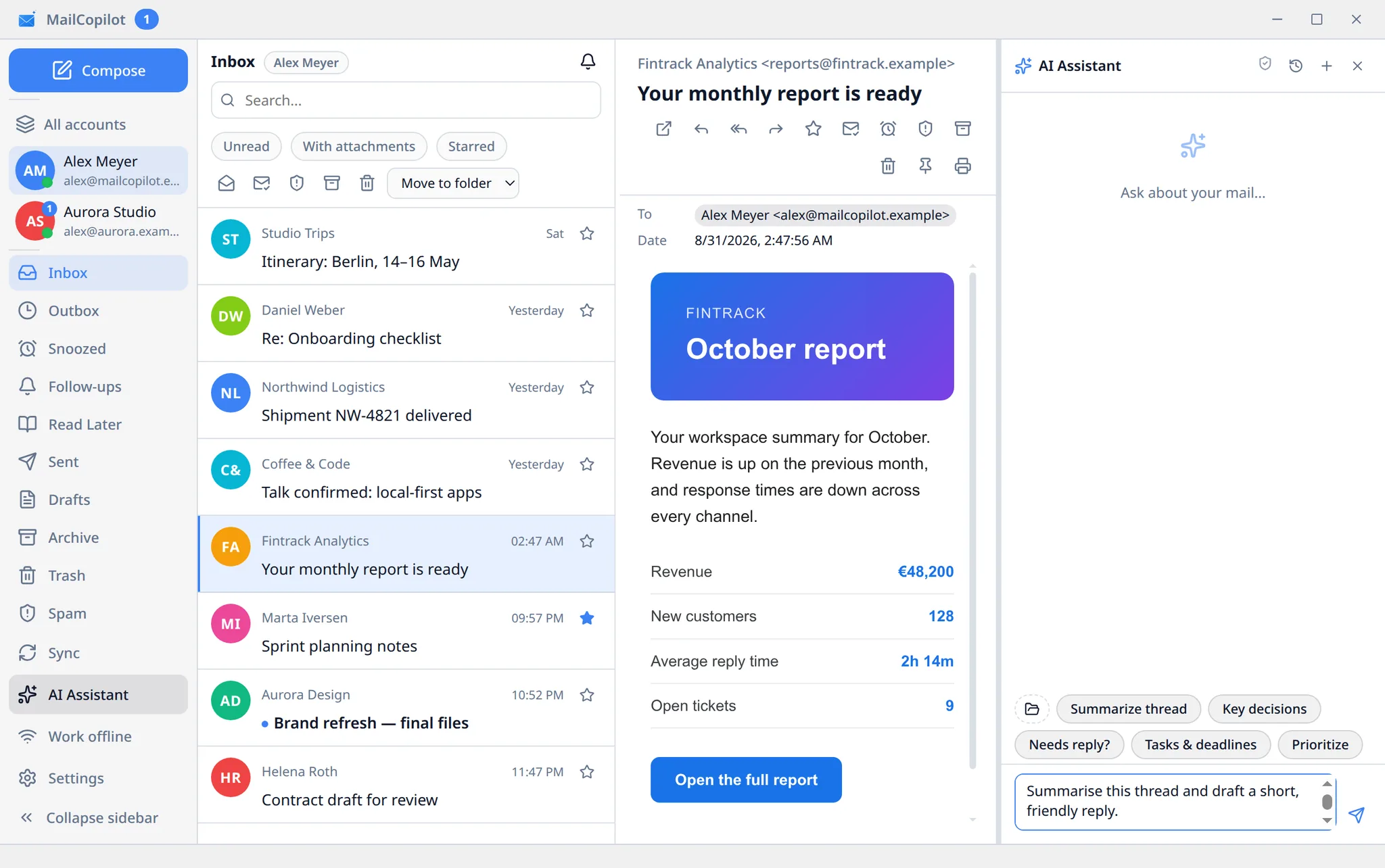
Why MailCopilot?
AI Assistant Built In
GTD triage, smart replies, auto-unsubscribe, web search, attachment reading — all out of the box with 3 AI providers.
Inbox Zero in Minutes
Snooze, follow-ups, send & archive, auto-advance, bulk actions — process your entire inbox at speed.
Connects to Your Tools
Integrates with Obsidian, task managers, calendars and more through the MCP open standard. Or expose your email for external AI agents.
Free & Open Source
Linux, Windows, macOS. Open source under AGPL-3.0 — the full code is on GitHub. No paywall, no hidden fees.
AI Assistant
Your email copilot powered by 3 AI providers with 45 MCP tools, GTD triage, and persistent memory.
3 AI Providers
Anthropic Claude, OpenAI (+ OpenRouter, Azure, LiteLLM), Google Gemini — or a local model like Ollama via any OpenAI-compatible endpoint. Bring your own key, with daily, monthly, and per-request budgets.
GTD Email Triage
AI classifies every email: archive, quick reply, delegate + follow-up, snooze, flag, or read later. Process your inbox the GTD way.
45 MCP Tools
Summarize, draft, send, archive, move, unsubscribe, search mail, SQL queries on cache — the AI operates your mailbox with precision.
Smart Compose
Instant Reply drafts plus one-click rewrites — improve, shorten, make formal, fix grammar — with a diff preview before anything changes.
Thread Summaries
An automatic AI summary above long conversations so you catch up in seconds. Opt-in per account.
Attachment Reading
AI reads PDFs (including scans), images, and text files attached to emails for full-context understanding.
Persistent Memory
AI remembers your preferences, writing style, and context across sessions with a built-in memory editor.
Web Search
AI searches the internet to find relevant information for composing informed replies.
Chat Sessions
Persistent chat history with multiple sessions. Switch between conversations and pick up where you left off.
MCP Ecosystem
Model Context Protocol (MCP) is an open standard that lets AI assistants connect to external tools and data sources. MailCopilot supports both client and server roles.
MCP Client
Connect external MCP servers — Obsidian, task managers, calendars, custom tools. Supports HTTP and stdio transports.
MCP Server
Expose your email tools for Claude Code, Obsidian AI, and other agents. Bearer auth, read-only by default, tool whitelist.
Key Features
Available now
Unified Inbox
All accounts, one view. Multi-account IMAP/SMTP, OAuth sign-in for Gmail and Outlook, instant delivery via IMAP IDLE, sender avatars via Gravatar.
Smart Search
Filter by from:, to:, subject:, is:unread, has:attachment, date ranges.
Quick Processing & Inbox Zero
Gmail-style keyboard shortcuts, command palette, bulk archive/delete/move/mark. Track your progress with a motivational counter and celebrate reaching zero.
Snooze, Reminders & Read Later
Postpone emails with presets or a custom date. Follow-up notifications after 2, 3, or 7 days. Save long emails to Read Later.
Email Templates
Create reusable templates with variables like {name}, {date}. Insert with keyboard shortcuts.
Privacy & Security
Keytar secrets, DOMPurify sanitization, tracking pixel blocking, image proxying with SSRF protection, TLS certificate pinning.
Customizable Settings
Light/dark theme, per-folder offline sync, auto-advance, sort modes, hotkey presets, language selection.
Send & Archive
Send a reply and archive the original in one action. Schedule emails for later, or undo a send before it leaves.
Dark Mode for Emails
Automatic inversion of HTML emails in dark theme for comfortable reading at night.
Offline Mode
Per-folder offline sync. Read and search your email without an internet connection.
Mail Rules
File incoming mail automatically: conditions on sender, subject, or attachments; actions like move, archive, star. Every rule run is logged.
Calendar Invites & RSVP
Invitation cards right in the email: accept, tentative, or decline — replies follow the iCalendar standard, time zones included.
How It Works
Connect Your Accounts
Add accounts via IMAP/SMTP, or sign in to Gmail and Outlook with OAuth2. Auto-configuration recognizes popular providers — Yahoo, iCloud, and more.
Triage in Unified Inbox
See all your mail in one place. Filter, search, and bulk-process effortlessly.
Work Smarter with AI
Compose with hotkeys, snooze emails, set follow-up reminders, and let AI triage your inbox by GTD, draft replies, and auto-unsubscribe from newsletters.
Security & Privacy
Your data stays on your machine. MailCopilot is designed with privacy-first principles.
Local Data Storage
Metadata and cache stored locally — nothing leaves your device unless you send it.
Encrypted Secrets
Account credentials secured via OS keychain (keytar).
Sandboxed Rendering
HTML emails rendered in sandbox with DOMPurify sanitization.
Tracker & Link Protection
External images blocked by default. Suspicious links detected, flagged, and auto-unsubscribe via RFC 8058.
Secure Image Loading
Built-in image proxy with SSRF protection for safe loading of external images.
TLS Certificate Pinning
Pin TLS certificates for your mail servers in the UI. Detect MITM attacks on email connections.
AI Guardrails
The AI can never send, delete, or move mail without your explicit confirmation — every action is preview-first. Internet access for the AI is off by default, with prompt-injection defense and rate limiting.
AI Audit Log
Every AI action is recorded — provider, model, tool, and cost — with JSON/CSV export in the Privacy & Audit panel.
Opt-in Telemetry
Nothing is collected without consent: telemetry asks on first launch and never includes message content, addresses, or search queries.
Roadmap
Honest development — here's what's next.
Calendar (CalDAV)
In progressInvite cards with RSVP (accept / tentative / decline) already work. Full CalDAV calendar sync is next.
Mobile App
PlannedNative mobile app for iOS and Android with offline support.
E2E Encryption (PGP/S/MIME)
PlannedEnd-to-end encryption for emails using PGP and S/MIME standards.
Frequently Asked Questions
Ready to Take Control of Your Email?
Download for free and experience AI-powered email management on Linux, Windows, and macOS.